Kickstart Fall 2026 Logistics
Setup
Please make sure to complete the setup steps below.
-
Ensure your HCC Account is active.
-
Sign into Swan's Open OnDemand Portal: https://swan-ood.unl.edu
-
When you have signed into the Swan Open OnDemand Portal, please put up your Yellow Sticky Note or Green Checkmark.
If you have any issues logging in or accesing Swan, please visit our event troubleshooting guide here
General Information and Links
Sticky Notes and Reactions
Throughout the workshop, we will use sticky notes and Zoom reactions to indicate status. These help instructors and helpers in the workshop assist with various issues and provide formative feedback during the workshops.
Please make sure the sticky note is visibly on both the front and back of your laptop
- Yellow Sticky Note / Green Check Reaction: All good to go
- Red Sticky Note / Red "X" Reaction: I need help or I am not ready to continue
How to use Zoom Reactions
-
In the menu bar at the bottom of the Zoom window, click on
React.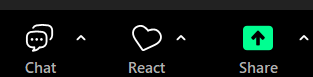
-
In the pop up panel, select the appropriate reaction.
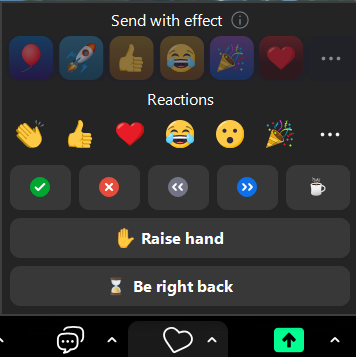
Full Details: https://support.zoom.com/hc/en/article?id=zm_kb&sysparm_article=KB0063323
Workshop Recommendations
To make the most of this workshop, we strongly encourage active participation throughout the entire session, including participating in the hands-on exercises and asking questions throughout the workshop.
If you are stuck or not sure on something at any point of the workshop, please let us know and we would be happy to help.
Participation can be accomplished by using the sticky notes, raising hands, or if you are remote, using the Zoom Reactions or use the Zoom chat box.
Room Location:
Nebraska Hall 213
Nebraska hall has some rooms that share similar numbers.
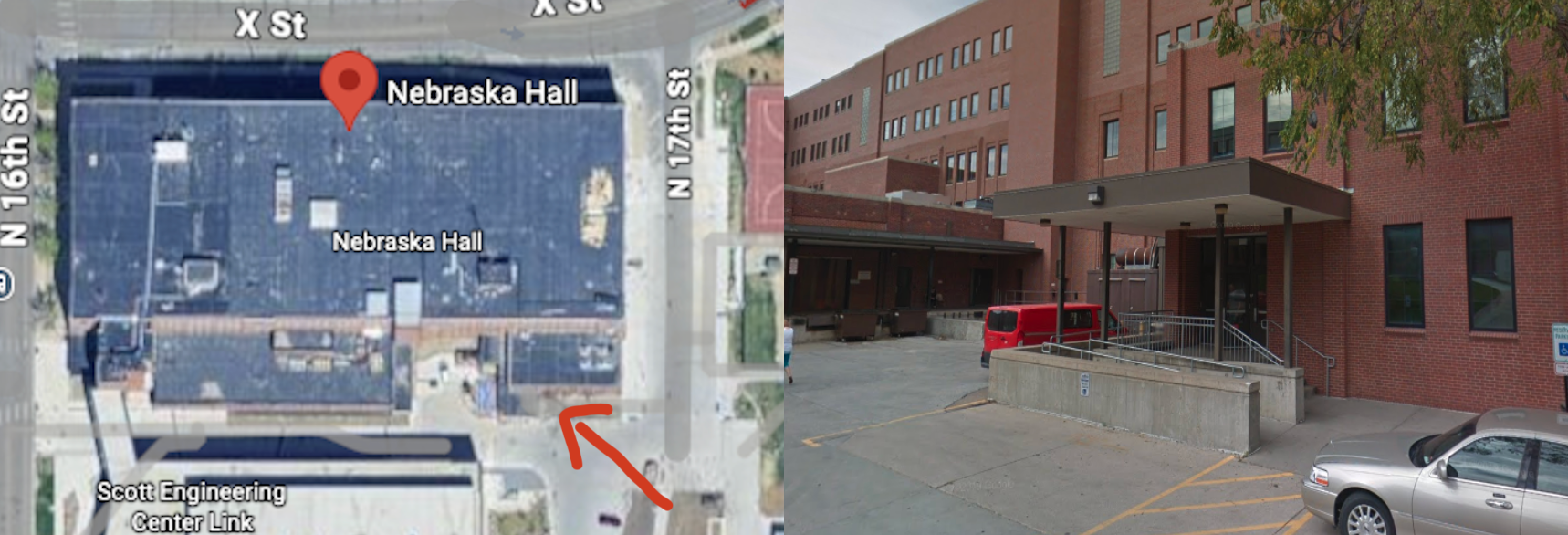
The event is being held in Room 213 on the southeast side of the building. The room is down one floor from HCC's new office space (Nebraska Hall 310)
Warning
If you enter from the north or west side, you may run into Room W213 first.
It is recommended to enter from the southeast corner of the building. Room 213 is next to the stairs and elevator that are at the southeast entrance.
Map URL: https://maps.unl.edu/NH
Parking Information - Click or Tap to reveal
Last Updated: September 29, 2026
If you are a UNL Student, Staff, or Faculty member, please use your designated parking.
Information below for UNO, UNMC, UNK, and other attendees
UNL Attendees without a parking permit
Visit https://maps.unl.edu/NH to see parking locations near Nebraska Hall. You can select "Visitor/Metered" parking to find metered parking on or near campus.
Alternatively you may purchase a pack of "Occasional Parking Permits", which allow you to park in "A" and "C" lots. More information at https://parking.unl.edu/parking/other-permits/#occasional-parking
UNO / UNK / UNMC with a permit at your primary campus
You will need to contact your campus's parking office atleast 1-2 business days in advance to set up reciprocal parking with UNL
Visit https://maps.unl.edu/NH to see parking locations near Nebraska Hall. You will need to select the appropriate parking lot type, either "A", "C", or both depending on your permit type.
Parking permits from UNK, UNO, UNMC and Nebraska Innovation Campus may be used on the UNL Campus for academic and business related activities; all other uses are prohibited unless authorized by Parking and Transit Services.
Source: https://parking.unl.edu/parking/other-permits/#reciprocal-parking
I don't have a permit within the University of Nebraska System
Visit https://maps.unl.edu/NH to see parking locations near Nebraska Hall. You can select "Visitor/Metered" parking to find metered parking on or near campus.
Links
Workshop Website: https://hcc.unl.edu/hcc-kickstart-2026
Feedback Form: https://forms.office.com/r/Yd4mdQ8Mpj
Introduction to Bash
Command History Link: https://hcc.unl.edu/swc-history/20260908.html
Slides Link: Fall 2026 Kickstart Slides
Job Examples Github Repository: git clone https://github.com/unlhcc/job-examples.git
git clone https://github.com/unlhcc/job-examples.git
Introduction to Bash (cont.) and Introduction to HCC
Bash Lesson Link: https://swcarpentry.github.io/shell-novice/
Git Lesson Link: https://swcarpentry.github.io/git-novice/
Warning
This is only available for attendees of the workshop.
If you are looking to test your knowledge and earn some credits for boosting your priority on Swan, please complete the following:
In order to receive priority QoS credit of <=6 CPU Months on Swan, you will need to:
-
Submit a job of your choice from the job-examples repository. Add "
-KICKSTART2026" to the job name and change the time limit to 8 hours and 30 minutes before submitting the job to Swan. -
For your choice of software, find the number of different versions currently available on Swan.
Example Name Change
For the MatLab Serial example, the original job name is matlab_serial. To complete the challenge, the job name would be changed to matlab_serial-KICKSTART2026
After completing these two tasks, send hcc-support@unl.edu an email by End-Of-Day of 09/15/2026 with the following:
- The output of seff for the job ran above (including the SLURM Job ID).
- The software name and number of different available versions from above.
- Answer to: Which file-system on Swan automatically deletes files not used for 6 months?
- (OPTIONAL): Any additional questions you have about HCC.
After we verify that your submitted answers are correct, we will send you an email and apply the priority credit to your HCC group.