GP-ENGINE NRP and K8s Tutorial Logistics - University of Arkansas - Little Rock
Overview
This workshop will give researchers a hands-on introduction to leveraging the large distributed computing resources available through the National Research Platform (NRP). Researchers will learn how to migrate an AI/ML workflow from their local computer or HPC Cluster to the NRP. By accessing Nautilus, you can gain access to a vast array of cutting-edge GPUs, ideal for facilitating AI research and accelerating your research.
When: June 25, 2026 9:00am - 12:30pm
Prerequisites:
- Required: Familiarity with Linux and/or the command-line
- Ideal: Experience using a remote computer for research or course work
- This can include HPC clusters, JupyterLab, Google Colab, and more.
Learning Objectives:
- Kubernetes Architecture and Concepts
- Hands-on with Nautilus HyperCluster
- Deploying Pods and Jobs in Kubernetes using Nautilus
- Deploying Scikit Learn ML Jobs to Kubernetes
- Deploying GPU Jobs to Kubernetes for Training Computer Vision Models
- Scaling Computer Vision Models on Kubernetes with Job Automation
These sessions will be delivered in an in-person format:
- In-Person: EIT Building 420 @ University of Arkansas - Little Rock
Workshop Registration
You must sign-in AND copy and paste your identity
In order for you to be added to the training group's namespace, your identity MUST match what the NRP sees. This is case sensitive!
You must also sign into NRP to have your identity as a valid account with NRP. You do not need to create an additional account as authentication is handled with your university system.
If you do not sign-in, your university identity will not be registered with the NRP and may prevent participation in the training.
Please select your campus. If your campus is not available, then you can use Google or Microsoft.
NRP Training Registration Form
Day of Workshop
Directions and Parking
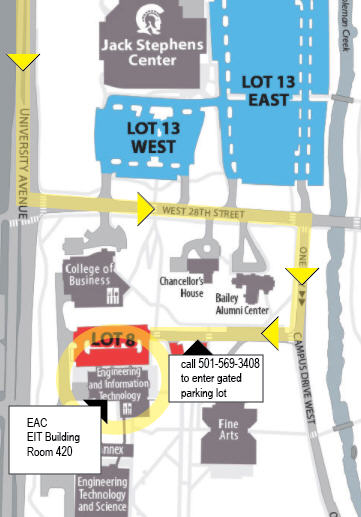
Directions from 630:
- South on University Ave. South
- Left on 28th
- Right on Campus Drive
- Next Right into Lot 8
When you arrive, call 501.916.5305 to have the campus police lift the gate.
Tell them your name and that you would like to be let into Lot 8 to visit the EAC in the EIT building.
(Should they ask if you have a parking pass tell them yes and we will provide one)
The EIT building is on the left.
Take stairs or elevator to 4th floor and look for room 420, first door on the left.
Ask for Tom Coffin the Operations Manager.
Check In
Check into the workshop for today
Check in is required to make sure the setup is complete!
If you do not see the namespace in the sign-in form listed below, please raise your hand or put up your red sticky note. You will need to be able to see this namespace to follow along in the hands-on activities!
Sticky Notes and Reactions
Throughout the workshop, we will use sticky notes to indicate status. These help instructors and helpers in the workshop assist with various issues and provide formative feedback during the workshops.
Please make sure the sticky note is visibly on both the front and back of your laptop
- Yellow Sticky Note: All good to go
- Red Sticky Note: I need help or I am not ready to continue
Workshop Recommendations
To make the most of this workshop, we strongly encourage active participation throughout the entire session, including participating in the hands-on exercises and asking questions throughout the workshop.
If you are stuck or not sure on something at any point of the workshop, please let us know and we would be happy to help.
Participation can be accomplished by using the sticky notes or raising hands.
Links and Steps
During the Workshop
Open these at the start:
When we move to the hands-on activities
- Sign into the GP-ENGINE JupyterHub Portal: https://gp-engine.nrp-nautilus.io/
- Select
Stack Datascience + K8sand clickStart. This process will take a few minutes. - Put up your yellow sticky note when you see it is complete.
Want to learn how to setup your own instance for a class or lab?
Check out the "Deploying JupyterHub" documentation: NRP Jupyter Hub Docs
Cloning the repository:
git clone https://github.com/MUAMLL/gp-engine-tutorials.git